
Product Overview
The iSound Twist Portable Bluetooth Wireless Speaker offers a unique design combined with superior sound quality. Its compact form factor allows for portability, while its advanced features enable wireless music streaming and hands-free calling. The speaker features full stereo sound with 6 watts total output from two 40mm drivers and a passive radiator for enhanced bass.
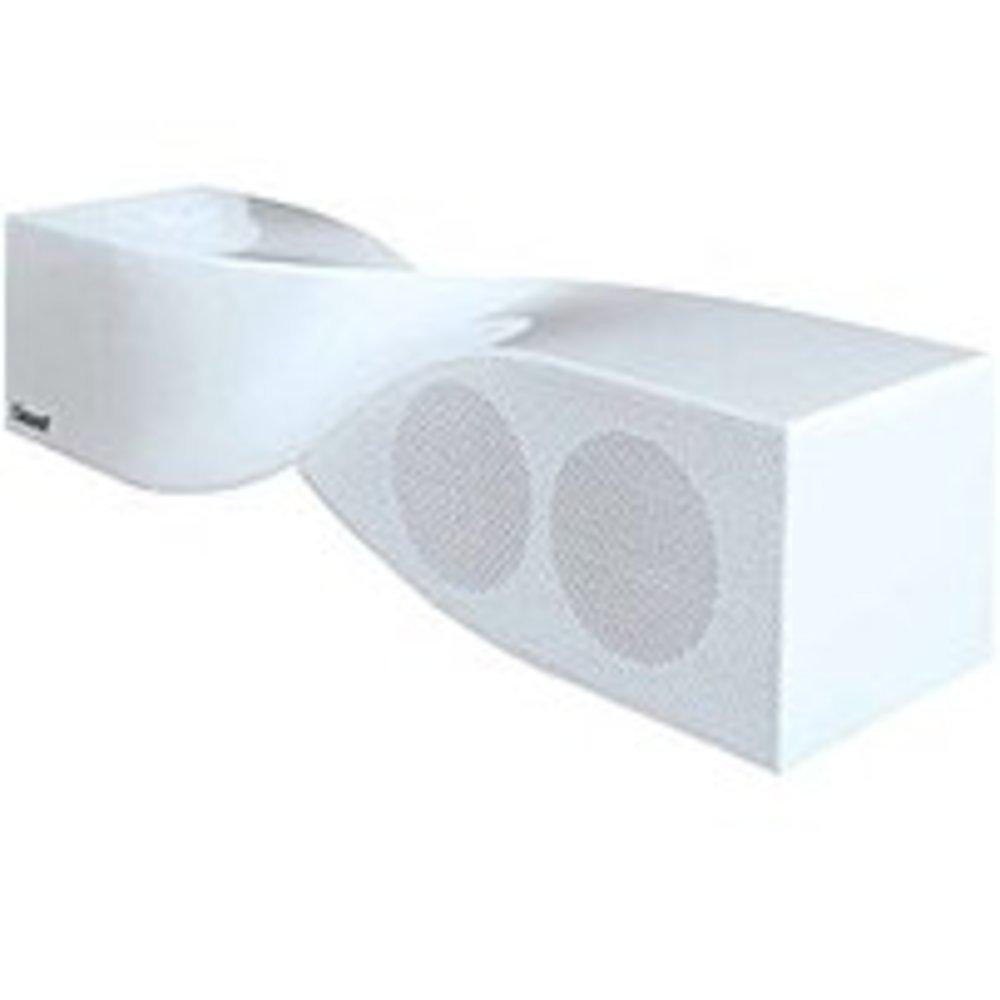
Image: The iSound Twist Portable Bluetooth Wireless Speaker in white, showcasing its unique twisted design.
Sadržaj paketa
- iSound Twist Portable Bluetooth Wireless Speaker
- USB kabl za punjenje
- 3.5mm AUX Input Cable
- Korisnički priručnik (ovaj dokument)
Setup
1. Punjenje zvučnika
Before initial use, fully charge the iSound Twist speaker. Connect the provided USB charging cable to the speaker's USB charging port and the other end to a powered USB source (e.g., computer, USB wall adapter). The charging indicator light will illuminate during charging and turn off when fully charged. A full charge provides up to 5 hours of continuous play.

Image: Rear panel of the speaker, highlighting the USB charging port, ON/OFF switch, and AUX IN port.
2. Uključivanje / isključivanje napajanja
Locate the ON/OFF switch on the rear panel of the speaker. Slide the switch to the "ON" position to power on the device. Slide it to the "OFF" position to power off.
3. Bluetooth uparivanje
- Ensure the speaker is powered on and within close proximity to your Bluetooth-enabled device (e.g., smartphone, tablet, laptop).
- The speaker will automatically enter Bluetooth pairing mode. A blue indicator light will flash, indicating it is discoverable.
- Na svom uređaju idite na postavke Bluetootha i omogućite Bluetooth.
- Traži available devices. The iSound Twist speaker should appear in the list, typically named "iSound Twist" or similar.
- Select the speaker from the list to initiate pairing. If prompted for a password, enter "0000".
- Once successfully paired, the blue indicator light on the speaker will stop flashing and remain solid. You will hear an audible confirmation.
- Your device is now connected, and you can stream audio wirelessly.
4. Priključak AUX ulaza
For devices without Bluetooth capability, or if you prefer a wired connection, use the provided 3.5mm AUX cable.
- Connect one end of the 3.5mm AUX cable to the AUX IN port on the rear of the speaker.
- Connect the other end of the cable to the headphone jack or audio output port of your audio device.
- Zvučnik će se automatski prebaciti u AUX ulazni način rada.
Uputstvo za upotrebu
Funkcije kontrolne table
The speaker features onboard controls located on its top surface for convenient operation.
- Dugme za napajanje / način rada: Pritisnite i držite za uključivanje/isključivanje. Kratki pritisak za prebacivanje između Bluetooth i AUX načina rada.
- Dugme za reprodukciju/pauzu/poziv: Short press to play or pause music. During an incoming call, short press to answer or end the call. Press and hold to reject an incoming call.
- Dugme za pojačavanje zvuka/sljedeću pjesmu: Short press to increase volume. Press and hold to skip to the next track.
- Dugme za smanjenje jačine zvuka/prethodnu pjesmu: Kratko pritisnite za smanjenje jačine zvuka. Pritisnite i držite za prelazak na prethodnu pjesmu.
Hands-free pozivanje
When connected via Bluetooth, the iSound Twist speaker's built-in microphone allows for hands-free phone calls.
- Odgovaranje na poziv: When a call comes in, the music will pause. Press the Play/Pause/Call button once to answer.
- Završetak poziva: During a call, press the Play/Pause/Call button once to end the call.
- Odbijanje poziva: Press and hold the Play/Pause/Call button to reject an incoming call.
Održavanje
- Držite zvučnik dalje od vode, vlage i ekstremnih temperatura.
- Očistite zvučnik mekom, suhom krpom. Ne koristite abrazivna sredstva za čišćenje ili rastvarače.
- Izbjegavajte ispuštanje ili izlaganje zvučnika jakim udarcima.
- Kada se ne koristi duži period, zvučnik čuvajte na hladnom i suhom mjestu i periodično ga punite kako biste održali bateriju u ispravnom stanju.
Rješavanje problema
| Problem | Rješenje |
|---|---|
| Zvučnik se ne uključuje. | Provjerite je li baterija napunjena. Spojite zvučnik na izvor napajanja pomoću USB kabela i pokušajte ponovo. |
| Nije moguće uparivanje putem Bluetootha. |
|
| Nema zvuka ili je jačina zvuka niska. |
|
| Kvalitet poziva je loš. |
|
Specifikacije
| Feature | Detalj |
|---|---|
| Naziv modela | ISOUND-1691 |
| Brand | iSound |
| Vrsta zvučnika | Toranj |
| Posebna karakteristika | Ugrađen mikrofon |
| Preporučena upotreba | For Smartphones or Tablets, Music Players |
| Kompatibilni uređaji | Desktop računar, laptop, MP3 plejer, projektor, pametni telefon, tablet, televizor |
| Konfiguracija kanala surround zvuka | 2.0 |
| Boja | Bijelo |
| Težina artikla | 13.6 unce |
| Je vodootporan | FALSE |
| Bežična komunikacijska tehnologija | Bluetooth |
| Veličina zvučnika | 0.75 inča |
| Izvor napajanja | Battery Powered |
| Broj baterija | Potrebna je 1 litijum-jonska baterija. (uključeno) |
| Vrsta audio drajvera | Dynamic Driver |
| Veličina audio drajvera | 40 milimetara |
| Dimenzije proizvoda | 5 x 4 x 11.75 inča |
| Maksimalna izlazna snaga zvučnika | 6 Watts |
| Tehnologija povezivanja | Bežični |
| Način audio izlaza | Stereo |
| Vrsta montaže | Tabletop Mount |
Zvanični video proizvoda
Video: Official product video for the iSound Twist Bluetooth Speaker, demonstrating its features and design. This video showcases the speaker's ability to stream audio from various devices and handle calls.
Garancija i podrška
The iSound Twist Portable Bluetooth Wireless Speaker comes with a Ograničena garancija. For specific warranty terms, conditions, and support inquiries, please refer to the warranty card included in your product packaging or visit the official iSound website.
For further assistance, please contact iSound customer support.