
Sonic Alert SBJ525SS
Sonic Alert SBJ525SS Digitalni budilnik Uputstvo za upotrebu
Model: SBJ525SS
Uvod
This manual provides comprehensive instructions for the setup, operation, and maintenance of your Sonic Alert SBJ525SS Digital Alarm Clock. Please read this manual thoroughly before using the device to ensure proper function and longevity. This alarm clock is designed to provide reliable timekeeping and alarm functions, including a powerful vibrating bed shaker, loud audible alarm, and visual alert features.
Sigurnosne informacije
- Ensure the power adapter is connected to a standard electrical outlet.
- Ne izlažite uređaj vodi ili prekomjernoj vlazi.
- Izbjegavajte postavljanje jedinice u blizini izvora topline ili na direktnu sunčevu svjetlost.
- Čuvati van domašaja djece.
- Use only the provided power adapter and bed shaker.
Sadržaj paketa
Provjerite da li se sve stavke nalaze u vašem paketu:
- Sonic Alert SBJ525SS Digital Alarm Clock Unit
- 12-Volt Vibrating Bed Shaker
- Adapter za napajanje
- Uputstvo za upotrebu
Product Overview
Upoznajte se s različitim dijelovima i kontrolama vašeg budilnika.
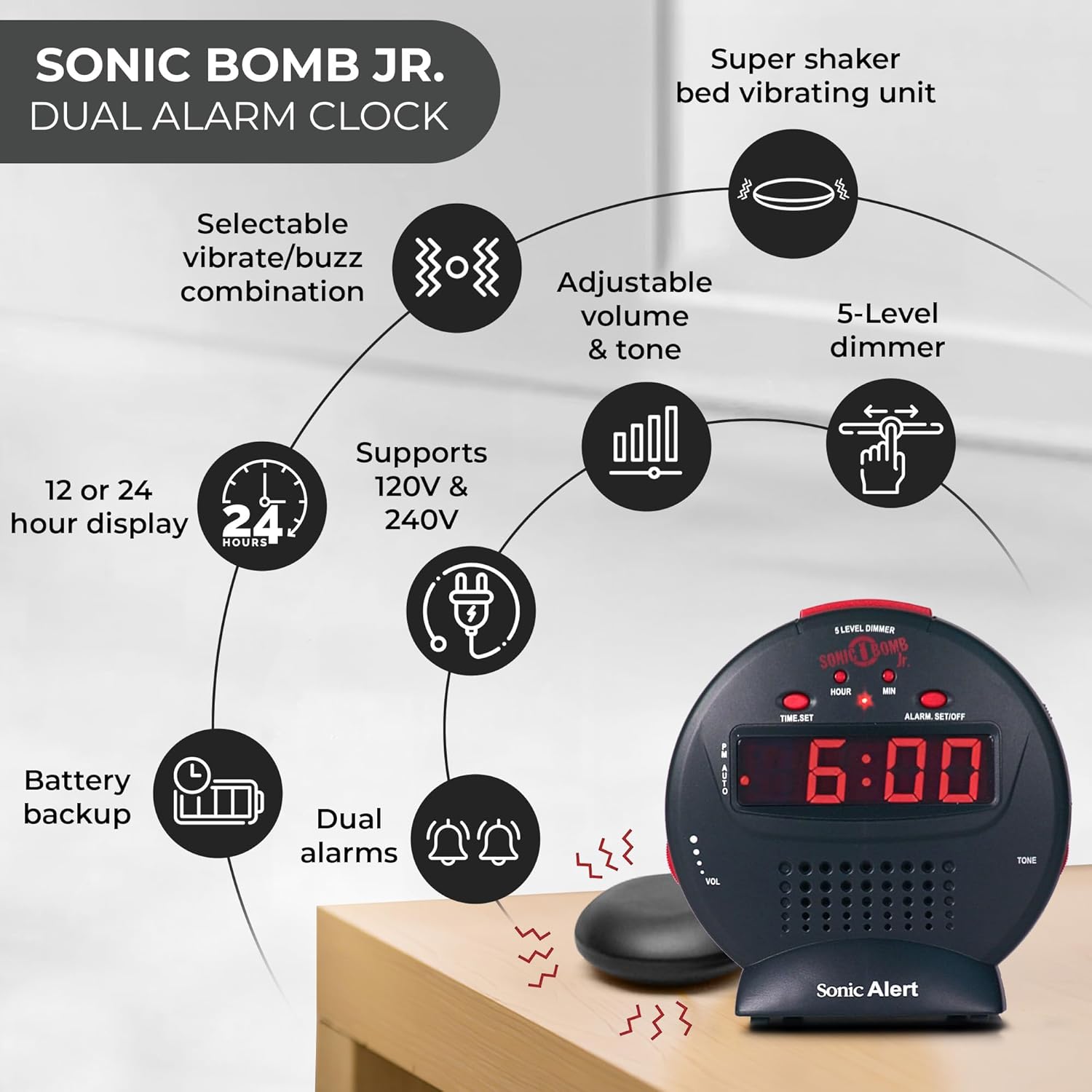
Opis slike: A diagram illustrating the Sonic Alert SBJ525SS Digital Alarm Clock. Key features highlighted include the 12 or 24-hour display, battery backup, dual alarms, selectable vibrate/buzz combination, adjustable volume and tone, 5-level dimmer, and the super shaker bed vibrating unit. The clock supports 120V & 240V power.
The clock features a large digital display, control buttons for time and alarm settings, and adjustment knobs for volume and tone. A dedicated port is available for the bed shaker connection.
Setup
1. Priključak za napajanje
- Connect the power adapter to the DC IN jack on the back of the alarm clock.
- Plug the power adapter into a standard electrical wall outlet. The display will illuminate.
2. Instalacija rezervne baterije
The alarm clock requires 2 AA batteries (not included) for battery backup functionality. This ensures your time and alarm settings are retained during a power outage.
- Pronađite odjeljak za baterije na dnu uređaja.
- Otvorite poklopac odeljka za baterije.
- Umetnite 2 AA baterije, pazeći na ispravan polaritet (+/-).
- Vratite poklopac odeljka za baterije.

Opis slike: A graphic illustrating the battery backup feature of the alarm clock. It shows the clock on a nightstand with a small circular battery icon (CR2032, 3V) next to it, indicating the type of battery used for backup. The text emphasizes that batteries are not included and are for retaining settings during power outages.
3. Podešavanje vremena
- Pritisnite i držite TIME SET dugme. Cifre za sate će početi da trepere.
- Pritisnite HOUR Pritisnite dugme više puta da biste podesili sate. Pratite PM indikator za ispravno AM/PM podešavanje.
- Pritisnite MIN više puta pritisnite dugme da biste podesili minute.
- Pritisnite TIME SET ponovo da potvrdite vreme.
- Za prebacivanje između 12-satnog i 24-satnog formata, pritisnite 12/24H button (if available, otherwise it might be part of time set cycle).
4. Bed Shaker Connection
The vibrating bed shaker is an integral part of the Sonic Alert system, designed for heavy sleepers or individuals with hearing impairments.
- Locate the jack labeled TREŠALICA on the back of the alarm clock.
- Insert the plug of the bed shaker into this jack.
- Place the bed shaker under your pillow, between your mattress and box spring, or under a fitted sheet for optimal vibration.

Opis slike: A composite image showing three different methods for placing the super bed shaker: under a pillow, under a fitted sheet, and under a mattress. The image also highlights the 6ft long cable of the shaker.
Uputstvo za upotrebu
1. Podešavanje alarma (dvostruki alarmi)
The SBJ525SS features dual alarms, allowing you to set two independent wake-up times.
- Pritisnite i držite POSTAVLJANJE/ISKLJUČIVANJE ALARM button once for Alarm 1. The hour digits for Alarm 1 will flash.
- Koristite HOUR i MIN dugmad za podešavanje željenog vremena alarma.
- Pritisnite POSTAVLJANJE/ISKLJUČIVANJE ALARM again to confirm Alarm 1 and proceed to Alarm 2. The hour digits for Alarm 2 will flash.
- Koristite HOUR i MIN buttons to set the desired time for Alarm 2.
- Pritisnite POSTAVLJANJE/ISKLJUČIVANJE ALARM a third time to confirm Alarm 2 and exit alarm setting mode.
- Da biste aktivirali ili deaktivirali alarm, pritisnite POSTAVLJANJE/ISKLJUČIVANJE ALARM button briefly (not held). Each press cycles through Alarm 1 ON, Alarm 2 ON, Both Alarms ON, Both Alarms OFF. An indicator light on the display will show which alarm(s) are active.

Opis slike: A bedroom scene with a couple sleeping, and the Sonic Alert alarm clock prominently displayed on a nightstand. The text overlay emphasizes the "Dual Alarm Clock" feature, allowing two different alarms to be set for reliable wake-up times.
2. Alarm Modes (Vibrate, Sound, Both)
The alarm clock offers various alert modes:
- Vibrate Only: The bed shaker will activate without an audible alarm.
- Samo zvuk: The audible alarm will sound without bed shaker activation.
- oba: Both the bed shaker and audible alarm will activate simultaneously.
To select the alarm mode, use the NAČIN ALARMA switch located on the side or back of the unit. Cycle through the options until your desired mode is selected.

Opis slike: A woman sleeping in bed with the Sonic Alert alarm clock and its bed shaker visible on the adjacent nightstand. The image highlights the clock's features: a powerful 6-volt bed shaker, 102dB loud alarm with adjustable tone and volume, alarm and bed shaker test mode, and built-in red flashing lights.
3. Funkcija odgode alarma
Kada se oglasi alarm, pritisnite veliko dugme SNOOZE button on top of the unit to temporarily silence the alarm. The alarm will sound again after the set snooze duration.
- The snooze duration is adjustable from 1 to 30 minutes. Refer to the full instruction manual for specific steps on adjusting the snooze time.
Opis slike: A man sleeping in bed with the Sonic Alert alarm clock on his bedside table. An overlay graphic shows a slider indicating the adjustable snooze duration from 1 to 30 minutes.
4. Brightness Dimmer
Adjust the display brightness to your preference using the 5-level dimmer function.
- Locirajte DIMMER control (often a slider or button) on the unit.
- Adjust the control to cycle through the 5 brightness levels, from brightest (5) to dimmest (1).

Opis slike: A woman sleeping in a bedroom with the Sonic Alert alarm clock on her nightstand. Below, a series of five clock images illustrate the different brightness levels of the display, from level 5 (brightest) to level 1 (dimmest), demonstrating the five-level dimmer feature.
5. Volume and Tone Adjustment
Customize the audible alarm sound to your preference.
- Koristite VOL (Volume) knob/slider to increase or decrease the alarm's loudness.
- Koristite TONE knob/slider to adjust the pitch of the alarm sound.
Opis slike: Krupni plan view of the Sonic Alert alarm clock, specifically highlighting the volume control slider on its side. The accompanying text explains how to adjust the sound with ease using the knobs for volume and tone.

Opis slike: The Sonic Alert alarm clock on a white surface, with a graphic overlay demonstrating the adjustable tone feature. Sound waves emanate from the clock, and a slider indicates the range of tone adjustments available.
6. USB Charging Port Usage
The alarm clock includes a built-in USB port for charging compatible handheld devices.
- Locate the USB charging port on the side or back of the unit.
- Connect your device's USB charging cable to the port.
- Ensure your device begins charging. Note that charging speed may vary depending on the device and cable.

Opis slike: A woman reaching for her smartphone, which is connected and charging via the built-in USB port on the Sonic Alert alarm clock, placed on a nightstand next to her bed.
Održavanje
- čišćenje: Obrišite uređaj mekom, suhom krpom. Ne koristite tekuća sredstva za čišćenje ili abrazivne materijale.
- Zamjena baterije: Replace backup batteries annually or when the battery low indicator appears to ensure continuous backup functionality.
- Skladištenje: Ako uređaj skladištite duži period, izvadite rezervne baterije kako biste spriječili curenje.
Rješavanje problema
| Problem | Mogući uzrok | Rješenje |
|---|---|---|
| Prikaz sata je isključen ili treperi. | Adapter za napajanje nije priključen ili je neispravan; nestalo strujetage. | Ensure power adapter is securely plugged in. Check wall outlet. If power outage, battery backup should maintain time (display will be off). |
| Alarm se ne oglašava/ne vibrira. | Alarm not activated; incorrect alarm mode selected; volume too low; bed shaker not connected. | Verify alarm is ON (indicator light). Check alarm mode switch. Increase volume. Ensure bed shaker is securely plugged in. |
| Postavke vremena/alarma se gube nakon nestanka strujetage. | Rezervne baterije su prazne ili nisu instalirane. | Install fresh AA batteries in the battery compartment. |
| USB charging is slow or not working. | Device incompatibility; faulty USB cable; device requires higher power output. | Try a different USB cable. Ensure your device is compatible with standard USB charging. The clock's USB port provides standard charging output. |
Specifikacije
| Brand | Sonic Alert |
| Broj modela | SBJ525SS |
| Display Type | Digital |
| Posebne karakteristike | Alarm, Auto Dimmable, Snooze, Vibrating Bed Shaker, USB Charging Port, Red Flashing Alert Lights |
| Izvor napajanja | Corded Electric with Battery Backup (2 AA batteries required, not included) |
| Dimenzije proizvoda | 5 cm Š x 5 cm V |
| Materijal | Plastika |
| Alarm Loudness | Up to 102dB (with bed shaker) |
Garancija i podrška
The Sonic Alert SBJ525SS Digital Alarm Clock comes with a Limited Warranty. For specific warranty terms and conditions, please refer to the warranty card included with your product or visit the official Sonic Alert website.
For technical support, troubleshooting assistance, or to inquire about replacement parts, please contact Sonic Alert customer service:
- Webstranica: www.sonicalert.com
- Kontakt informacije: Obratite se službeniku webnajnovije kontakt podatke potražite na lokaciji ili pakovanju proizvoda.
Opis slike: An open instruction manual for the Sonic Bomb Jr. alarm clock, showing detailed operational instructions and diagrams. This image signifies that a manual is included with the product for user guidance.
Ask a question about this manual
Ask about setup, troubleshooting, compatibility, parts, safety, or missing instructions. Manuals+ will review the question and use this page’s manual context to help answer it.