
Uvod
This manual provides comprehensive instructions for the Logilink UA0107 HDD Enclosure, designed to house a 3.5-inch SATA hard disk drive and connect it to your computer via USB 3.0. Its robust aluminum casing ensures durability and efficient heat dissipation, protecting your valuable data.

Image: The Logilink UA0107 HDD Enclosure, showcasing its sleek black aluminum design.
The UA0107 supports hot-swap functionality and offers high-speed data transfer rates up to 5 Gbit/s, making it an ideal solution for external storage, data backups, and efficient data transfer between systems.
Sadržaj paketa
Please verify that all items listed below are included in your package. If any items are missing or damaged, please contact your retailer immediately.
- Logilink UA0107 3.5" HDD Enclosure
- USB 3.0 kabel
- Adapter za napajanje
- Screws for HDD mounting
- Mini odvijač

Image: The Logilink UA0107 HDD Enclosure alongside its retail box, indicating included accessories.
Uputstva za postavljanje
- Pripremite ogradni prostor: Carefully slide open the enclosure casing. The aluminum cover should slide off to reveal the internal tray.
- Instalirajte tvrdi disk: Connect your 3.5-inch SATA hard disk drive to the SATA data and power connectors on the internal circuit board. Ensure a firm connection. Secure the HDD to the tray using the provided screws and screwdriver.
- Zatvorite priloženi materijal: Slide the aluminum casing back onto the internal tray until it clicks securely into place.
- Povežite se na napajanje: Plug the power adapter into the enclosure's DC input port, then connect the adapter to a wall outlet.
- Povežite se na računar: Connect one end of the supplied USB 3.0 cable to the enclosure's USB 3.0 port and the other end to an available USB 3.0 port on your computer. For optimal performance, use a USB 3.0 port.
The enclosure is typically plug-and-play, and your operating system should automatically detect and install the necessary drivers. If the drive is new, it may need to be initialized and formatted through your operating system's Disk Management utility (Windows) or Disk Utility (macOS) before use.
Rukovanje kućištem
- Uključeno: Once connected to power and your computer, the enclosure will power on. An LED indicator (if present) will typically illuminate.
- Pristup podacima: The hard drive will appear as a removable disk drive in "My Computer" (Windows) or "Finder" (macOS). You can now access, transfer, and store filekao što biste to učinili sa bilo kojim drugim diskom.
- Funkcionalnost vruće zamjene: The UA0107 supports hot-swapping, meaning you can connect or disconnect the enclosure while your computer is running. However, always ensure data transfer is complete and safely eject the drive before disconnecting to prevent data corruption.
- Sigurno uklanjanje: Before disconnecting the enclosure, always use the "Safely Remove Hardware and Eject Media" option in Windows or drag the drive icon to the Trash/Eject icon in macOS to ensure all data operations are finalized.
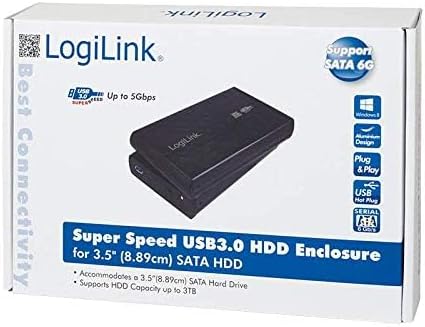
Image: The product packaging, emphasizing its Super Speed USB 3.0 and SATA 6G capabilities.
Održavanje
- čišćenje: Za čišćenje vanjske strane kućišta koristite meku, suhu krpu. Ne koristite tekuća sredstva za čišćenje ili otapala.
- Skladištenje: Kućište čuvajte na hladnom i suhom mjestu, dalje od direktne sunčeve svjetlosti i ekstremnih temperatura.
- Rukovanje: Izbjegavajte ispuštanje ili izlaganje kućišta jakim udarcima, jer to može oštetiti interni tvrdi disk.
- ventilacija: Ensure the enclosure has adequate ventilation during operation to prevent overheating, especially during prolonged use.
Rješavanje problema
- Problem: Drive not detected by computer.
- Rješenje:
- Ensure the power adapter is securely connected to the enclosure and a working power outlet.
- Verify the USB cable is firmly connected to both the enclosure and your computer's USB port. Try a different USB port.
- Check the internal SATA connection of the hard drive within the enclosure.
- Za nove diskove, provjerite da li su inicijalizirani i formatirani u Upravljanju diskovima (Windows) ili Uslužnom programu diska (macOS) vašeg operativnog sistema.
- Test the enclosure with a different hard drive, or test the hard drive in another enclosure/system to isolate the issue.
- Problem: Male brzine prijenosa podataka.
- Rješenje:
- Provjerite da li ste povezani na USB 3.0 port na računaru. USB 2.0 portovi će rezultirati znatno manjim brzinama.
- Verify the USB 3.0 cable is not damaged.
- Performanse samog tvrdog diska mogu utjecati na brzinu prijenosa podataka.
- Problem: Enclosure disconnects randomly.
- Rješenje:
- Uvjerite se da je napajanje stabilno.
- Provjerite ima li labavih priključaka USB kabla.
- Disable USB selective suspend settings in your computer's power options (Windows).
Specifikacije
| Feature | Detalj |
|---|---|
| Broj modela | UA0107 |
| Kompatibilni uređaji | Laptop (and Desktop PCs) |
| Faktor oblika tvrdog diska | 3.5 inča |
| Maksimalni podržani kapacitet | 6 TB |
| Brzina prijenosa podataka | 6 gigabita u sekundi (USB 3.0) |
| Hardversko sučelje | USB 3.0, SATA |
| Materijal | Aluminijum |
| Boja | Crna |
| Dimenzije artikla (DxŠxV) | 10.43 x 7.09 x 2.05 inča |
| Težina artikla | 10.6 unci (0.3 kilograma) |
Garancija i podrška
Logilink products are designed for reliability and performance. For specific warranty information or technical support, please refer to the documentation included with your purchase or visit the official Logilink website. It is recommended to keep your proof of purchase for any warranty claims.