
Uvod
The GIGABYTE GM-M7600 is a wireless precision optical mouse designed for comfortable and reliable use. This manual provides instructions for setting up, operating, maintaining, and troubleshooting your device.
Sadržaj paketa
Molimo Vas da provjerite sadržaj paketa kako biste bili sigurni da su svi artikli prisutni:
- GIGABYTE GM-M7600 Wireless Optical Mouse
- Portable Nano USB Receiver
- 2 x AAA baterije
Setup
1. Instaliranje baterija
The GM-M7600 mouse requires two AAA batteries for operation. The batteries are included in the package.
- Pronađite poklopac pretinca za bateriju na donjoj strani miša.
- Lagano povucite ili podignite poklopac da biste otvorili pretinac.
- Umetnite dvije AAA baterije, pazeći da pozitivni (+) i negativni (-) terminali budu pravilno poravnati s oznakama unutar odjeljka.
- Čvrsto zatvorite poklopac odeljka za baterije.
2. Povezivanje USB prijemnika
The mouse connects to your computer via a portable Nano USB receiver.
- Locate the Nano USB receiver. It may be stored inside the mouse's battery compartment or packaged separately.
- Plug the Nano USB receiver into an available USB port on your computer (Laptop or Personal Computer).
- Your operating system (e.g., Windows XP, Linux) should automatically detect and install the necessary drivers. This process may take a few moments.
- Nakon što su upravljački programi instalirani, miš je spreman za upotrebu.
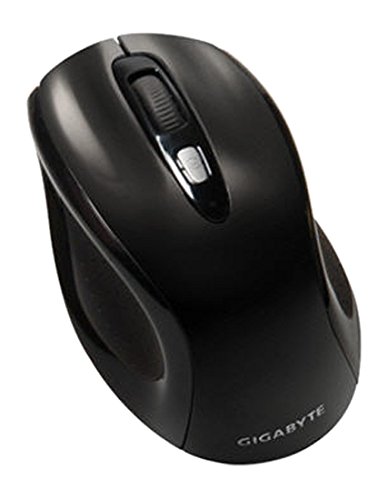
Slika 1: GIGABYTE GM-M7600 Wireless Optical Mouse. This image displays the ergonomic design of the mouse, highlighting its form factor and the location of its buttons. The Nano USB receiver is typically stored within the mouse or connected to a computer's USB port.
Uputstvo za upotrebu
1. Uključivanje / isključivanje napajanja
The mouse typically has a power switch on its underside. Slide the switch to the 'ON' position to activate the mouse. Slide it to 'OFF' when not in use to conserve battery life.
2. Adjusting DPI (Sensitivity)
The GM-M7600 features an adjustable DPI switch, allowing you to change the mouse sensitivity between 800 DPI and 1600 DPI. This switch is usually located near the scroll wheel. Press the DPI button to toggle between the two sensitivity settings.
3. Osnovne funkcije miša
- Lijevi klik: Primarno dugme za odabir stavki, otvaranje filei interakcija sa softverom.
- Desni klik: Sekundarno dugme za pristup kontekstnim menijima i dodatnim opcijama.
- Točak za pomicanje: Koristi se za listanje kroz dokumente i web stranice. Može funkcionirati i kao srednji klik.
Održavanje
1. Čišćenje
Za održavanje optimalnih performansi i izgleda:
- Disconnect the mouse from your computer and turn off the power switch.
- Koristite meku krpu koja ne ostavlja dlačiceampvodom ili blagim rastvorom za čišćenje obrišite površinu miša.
- Izbjegavajte upotrebu jakih hemikalija, abrazivnih sredstava za čišćenje ili prskanje tekućina direktno na miš.
- Clean the optical sensor area on the underside of the mouse with a dry cotton swab to remove any dust or debris.
2. Zamjena baterije
When the mouse performance degrades or it stops responding, it may be time to replace the batteries.
- Isključite miš pomoću prekidača za napajanje.
- Open the battery compartment as described in the 'Installing Batteries' section.
- Uklonite stare AAA baterije.
- Umetnite dvije nove AAA baterije, pazeći na ispravan polaritet (+/-).
- Close the battery compartment and turn the mouse back on.
Rješavanje problema
If you encounter issues with your GIGABYTE GM-M7600 mouse, try the following solutions:
- Miš ne reaguje:
- Uvjerite se da je miš uključen.
- Provjerite jesu li baterije pravilno instalirane i dovoljno napunjene. Zamijenite ih ako je potrebno.
- Ensure the Nano USB receiver is securely plugged into a working USB port on your computer. Try a different USB port.
- Ponovo pokrenite računar.
- Nepravilno kretanje kursora:
- Očistite optički senzor na donjoj strani miša.
- Pobrinite se da miš koristite na odgovarajućoj površini. Izbjegavajte površine s visokom reflektirajućom površinom ili prozirne površine.
- Check for any wireless interference. Move the mouse closer to the receiver or away from other wireless devices.
- DPI switch not working:
- Provjerite je li miš uključen i povezan.
- Čvrsto pritisnite dugme DPI.
Specifikacije
| Naziv modela | GM-M7600 |
| Brand | GIGABYTE |
| Tehnologija povezivanja | 2.4GHz Radio Frequency Wireless |
| Otkrivanje pokreta | Optički |
| Podesivi DPI | 800 / 1600 DPI |
| Broj dugmadi | 3 (Lijeva, Desna, Kotačić za pomicanje/Srednji klik) |
| Izvor napajanja | 2 x AAA baterije (uključene) |
| Vrsta prijemnika | Portable Nano USB Receiver |
| Kompatibilni uređaji | Laptop, personalni računar |
| Podrška za operativni sistem | Linux, Windows XP |
| Materijal kućišta | Plastic with Rubberized Finish |
| Boja | Crna |
Garancija i podrška
For warranty information and technical support, please refer to the warranty card included with your product or visit the official GIGABYTE website. Sačuvajte račun o kupovini za reklamacije.