
Logitech M510 (910-001822)
Logitech M510 bežični miš korisnički priručnik
Model: M510 (910-001822)
Uvod
This manual provides comprehensive instructions for the setup, operation, maintenance, and troubleshooting of your Logitech M510 Wireless Mouse. Designed for comfort and efficiency, the M510 offers precise control and convenient features for your computing needs.
The Logitech M510 is a comfortable wireless computer mouse featuring a USB Unifying Receiver, back/forward buttons, and side-to-side scrolling. It operates on 2 AA batteries and is compatible with Personal Computers and Macbooks running operating systems like Windows 10.
Sadržaj paketa
- Logitech M510 bežični miš
- Logitech Unifiing prijemnik
- 2 AA baterije (unaprijed instalirane ili uključene)
Setup
1. Instalacija baterije
The Logitech M510 mouse requires two AA batteries for operation. These are typically included with your purchase. If not already installed, follow these steps:
- Pronađite poklopac pretinca za bateriju na donjoj strani miša.
- Pomaknite ili podignite poklopac da biste otvorili pretinac.
- Umetnite dvije AA baterije, pazeći da pozitivni (+) i negativni (-) terminali budu pravilno poravnati s indikatorima unutar odjeljka.
- Čvrsto zatvorite poklopac odeljka za baterije.
2. Povezivanje Unifying prijemnika
The Logitech M510 uses a Logitech Unifying Receiver for wireless connectivity. This small USB receiver allows you to connect multiple compatible Logitech devices to your computer using a single USB port.
- Locate the Logitech Unifying Receiver. It is often stored inside the battery compartment of the mouse for safekeeping during transport.
- Plug the Unifying Receiver into an available USB port on your computer (desktop, laptop, or Macbook).
- Your computer should automatically detect the receiver and install the necessary drivers. This may take a few moments.
- Once the drivers are installed, the mouse should be ready for use. If not, ensure the mouse's power switch (if present) is in the 'ON' position.

Slika: Od vrha prema dolje view of the Logitech M510 Wireless Mouse alongside its compact USB Unifying Receiver.
Upravljanje mišem
The Logitech M510 Wireless Mouse is designed for intuitive use with several programmable buttons and comfortable ergonomics.
Osnovne funkcije
- Lijevi klik na dugme: Primarno dugme za odabir stavki, otvaranje filei interakcija sa softverom.
- Desni klik na dugme: Sekundarno dugme za pristup kontekstnim menijima i dodatnim opcijama.
- Točak za pomicanje: Pomičite se gore ili dolje kroz dokumente i web pages. The scroll wheel also functions as a middle-click button.
- Side-to-Side Scrolling: Tilt the scroll wheel left or right to scroll horizontally in applications that support this feature.
Advanced Features (Programmable Buttons)
The M510 features two thumb buttons (back/forward) on the left side, which can be customized using Logitech Options software (available for download from the Logitech website). By default, these buttons perform browser navigation functions.
- Dugme za povratak: Navigira nazad unutra web pretraživači ili file istraživači.
- Dugme naprijed: Navigira naprijed u web pretraživači ili file istraživači.
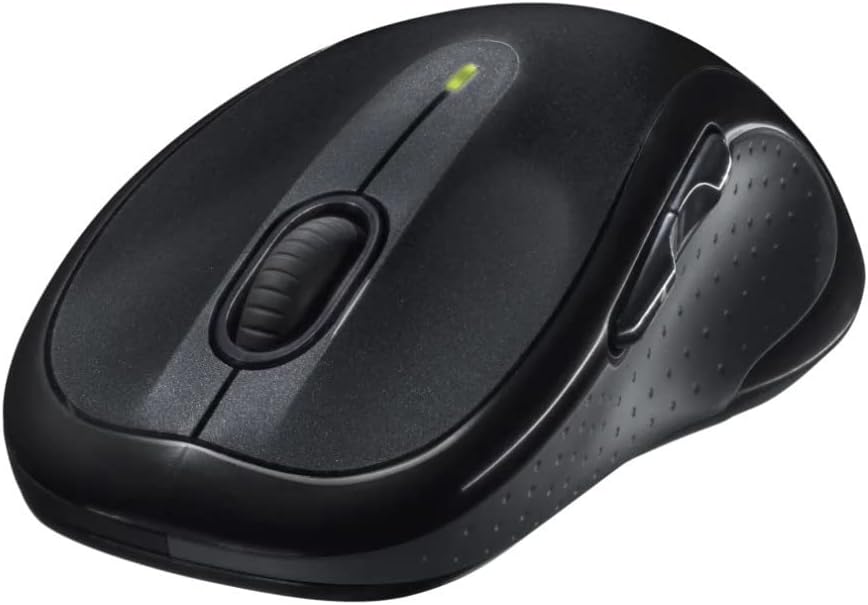
Slika: Ugaona view of the Logitech M510 Wireless Mouse, highlighting its ergonomic shape and side buttons.
Održavanje
Čišćenje vašeg miša
To ensure optimal performance and hygiene, regularly clean your Logitech M510 mouse:
- Disconnect the mouse from your computer by removing the Unifying Receiver.
- Lagano koristite meku krpu koja ne ostavlja dlačice dampened with water or a mild cleaning solution (e.g., isopropyl alcohol) to wipe down the surface of the mouse.
- For crevices and around buttons, use a cotton swab or a soft brush.
- Avoid getting liquid into the internal components or the optical sensor.
- Allow the mouse to dry completely before re-connecting.
Zamjena baterije
The Logitech M510 has an average battery life of 18 months. When the battery indicator light (if present) flashes or mouse performance degrades, it's time to replace the batteries.
- Isključite miš pomoću prekidača za napajanje na donjoj strani.
- Otvorite poklopac odeljka za baterije.
- Uklonite stare AA baterije.
- Umetnite dvije nove AA baterije, pazeći na ispravan polaritet (+/-).
- Zatvorite poklopac odeljka za baterije.
- Ponovo uključite miš.
Rješavanje problema
| Problem | Mogući uzrok | Rješenje |
|---|---|---|
| Miš ne reaguje | Low or dead batteries; Unifying Receiver not connected; Mouse power off; Driver issue. | Replace batteries; Ensure Unifying Receiver is securely plugged into a USB port; Turn mouse power switch to 'ON'; Reinstall Logitech Options software or check device manager for driver issues. |
| Lagging or erratic cursor movement | Interference; Dirty optical sensor; Mouse used on unsuitable surface; Low battery. | Move mouse closer to receiver; Clear obstructions; Clean optical sensor; Use a mouse pad or suitable surface; Replace batteries. |
| Bočne tipke ne rade | Software not installed or configured; Application does not support custom buttons. | Download and install Logitech Options software from the official Logitech website to customize button functions. Ensure the application you are using supports these functions. |
| Unifying Receiver not recognized | Faulty USB port; Driver issue. | Try a different USB port; Restart your computer; Download and install the Logitech Unifying Software to re-pair the mouse with the receiver. |
Specifikacije
| Feature | Detalj |
|---|---|
| Brand | Logitech |
| Broj modela | 910-001822 |
| Serije | M510 |
| Tehnologija povezivanja | Radio Frequency, USB (via Unifying Receiver) |
| Tehnologija detekcije pokreta | Laser |
| Boja | Tamno siva |
| Težina artikla | 4.6 unci (približno 130 grama) |
| Dimenzije proizvoda (DxŠxV) | 4.38 x 2.5 x 1.75 inča (približno 11.13 x 6.35 x 4.45 cm) |
| Izvor napajanja | Battery Powered |
| Baterije su potrebne | 2 AA baterije (uključene) |
| Prosječno trajanje baterije | 18 mjeseca |
| Hardverska platforma | Personal Computer, Macbook |
| Kompatibilnost operativnog sistema | Windows 10 (and likely earlier versions, macOS) |
| Posebne karakteristike | Battery Life Indicator, Power Saving Mode, Programmable Buttons, Wireless |
| Datum prve dostupnosti | 7. juna 2010 |

Slika: Od vrha prema dolje view of the Logitech M510 Wireless Mouse showing its approximate dimensions (4.4" length, 2.5" width).
Garancija i podrška
Informacije o garanciji
Logitech products typically come with a limited hardware warranty. For specific warranty terms and conditions applicable to your Logitech M510 Wireless Mouse, please refer to the warranty card included with your product or visit the official Logitech website.
Korisnička podrška
For further assistance, technical support, or to download the latest software (such as Logitech Options or Unifying Software), please visit the official Logitech support webstranica:
Također možete pronaći korisne resurse, često postavljana pitanja i forume zajednice na njihovim website.