
1. Uvod
This manual provides comprehensive instructions for the setup, operation, and maintenance of your KitVision 7-inch Digital Photo Frame, model DPF7BKK. Please read this manual thoroughly before using the device to ensure proper functionality and longevity.

Slika 1: Prednja strana view of the KitVision 7-inch Digital Photo Frame. The frame is silver with a black bezel, displaying a vibrant image of a person holding a child on a beach.
2. Sadržaj paketa
Provjerite da li se u vašem paketu nalaze sve dolje navedene stavke:
- KitVision 7-inch Digital Photo Frame (DPF7BKK)
- Napajanje ispravljač
- Odvojivi stalak
- Korisnički priručnik (ovaj dokument)

Figure 2: The product packaging for the KitVision 7-inch Digital Photo Frame. The box features a blue background with wave patterns and an image of the digital photo frame displaying a beach scene.
3. Proizvod je gotovview
3.1. Rear Panel and Controls

Slika 3: Pozadi view of the digital photo frame. Visible features include the USB port, SD/MMC/MS card slot, DC power input, control buttons (ENTER, arrows, MENU, STANDBY), and a detachable stand.
- USB port: Za povezivanje USB fleš diskova.
- SD/MMC/MS Card Slot: For inserting compatible memory cards.
- DC ulaz: Power connection port for the AC adapter.
- Kontrolna dugmad:
- ENTER: Potvrđuje odabire.
- < / > (Left/Right Arrows): Navigates through menus and images.
- ^ / v (Up/Down Arrows): Kreće kroz menije i opcije.
- MENI: Pristup glavnom meniju.
- PRIČEKAJ: Powers the frame on or off.
- Detachable Stand: Allows for tabletop placement in landscape or portrait orientation.
- Otvor za montažu na zid: For mounting the frame on a wall.
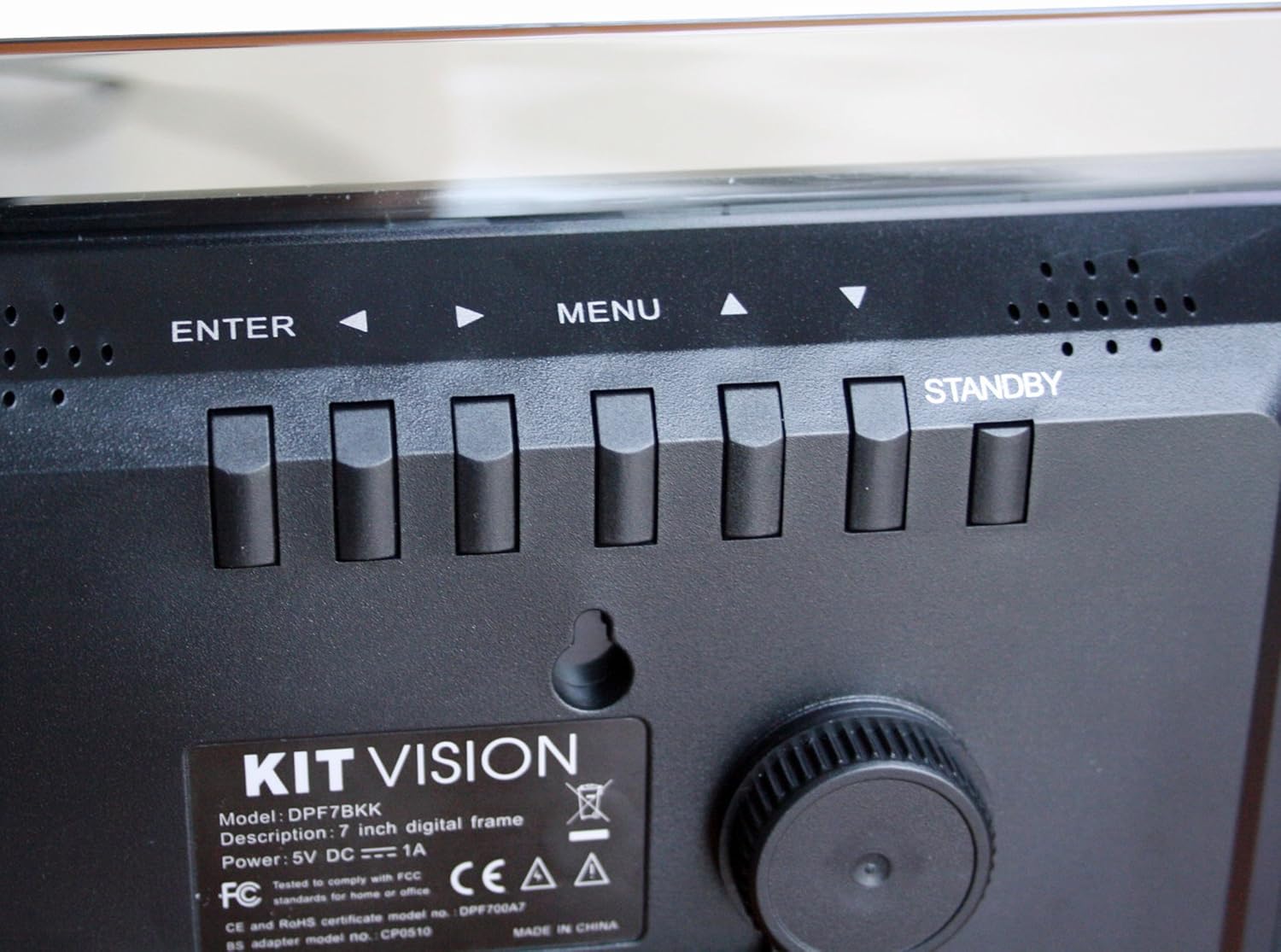
Slika 4: Krupni plan view of the control buttons and product label on the rear of the digital photo frame. The label clearly shows "KITVISION", "Model: DPF7BKK", and power specifications.
4. Podešavanje
4.1. Pričvršćivanje postolja
- Locate the detachable stand in the package.
- Insert the stand's peg into the designated hole on the rear of the photo frame.
- Rotate the stand to secure it in place and adjust the angle for optimal viewing. The stand supports both landscape and portrait orientations.
4.2. Priključak za napajanje
- Connect the AC power adapter to the DC input port on the rear of the frame.
- Drugi kraj adaptera za napajanje priključite u standardnu električnu utičnicu.
- The frame will typically power on automatically or can be turned on using the STANDBY button.
4.3. Inserting a Memory Card or USB Drive
The frame supports SD, MMC, MS memory cards, and USB flash drives. Ensure your photos are in a compatible format (e.g., JPEG).
- Carefully insert your memory card into the SD/MMC/MS slot or your USB flash drive into the USB port.
- Ensure the card or drive is inserted correctly and fully seated. Do not force it.
- The frame should automatically detect the storage device and begin displaying photos, or prompt you to select a source.
5. Uputstvo za upotrebu
5.1. Osnovna navigacija
- Koristite </> (Left/Right) and ^ / v (Up/Down) arrow buttons to navigate through menus and select options.
- Pritisnite ENTER button to confirm a selection or open a sub-menu.
- Pritisnite MENU button to return to the previous menu or access the main menu from a slideshow.
- Pritisnite i držite PRIČEKAJ button to power the frame off or on.
5.2. Viewing Photos
Once a memory card or USB drive is inserted, the frame will typically start a slideshow automatically. If not, navigate to the "Photo" or "Slideshow" option in the main menu and press ENTER.
5.3. Slideshow Settings
To customize your slideshow:
- Pritisnite MENU dugme za pristup glavnom meniju.
- Navigate to "Settings" or "Slideshow Options" using the arrow buttons and press ENTER.
- Adjust settings such as:
- Vrijeme prikaza: Duration each photo is shown.
- Prijelazni efekat: How photos change (e.g., fade, wipe).
- Režim ponavljanja: Loop all photos or play once.
- Photo Order: Sequential or random.
- Pritisnite ENTER to confirm changes and MENU za izlaz.
6. Održavanje
6.1. Čišćenje okvira
- Uvijek isključite strujni adapter prije čišćenja.
- Koristite meku, suhu krpu koja ne ostavlja dlačice da nježno obrišete ekran i okvir.
- Za tvrdokorne tragove na ekranu, lagano očistiteampOperite krpu vodom ili sredstvom za čišćenje ekrana. Ne prskajte tekućinu direktno na ekran.
- Avoid using abrasive cleaners, solvents, or alcohol-based solutions, as these can damage the surface.
6.2. Skladištenje
- When not in use for extended periods, store the digital photo frame in a cool, dry place, away from direct sunlight and extreme temperatures.
- It is recommended to store the frame in its original packaging to protect it from dust and physical damage.
7. Otkrivanje problema
| Problem | Mogući uzrok | Rješenje |
|---|---|---|
| Okvir se ne uključuje. | No power, faulty adapter, or STANDBY button not pressed. | Ensure power adapter is securely connected to both the frame and a working electrical outlet. Press the STANDBY button. Try a different outlet. |
| Nema prikazanih slika. | No memory card/USB, incompatible file format, or card/USB not inserted correctly. | Insert a memory card or USB drive with compatible image files (JPEG). Ensure it is fully seated. Check if the frame is set to the correct source input in the menu. |
| Images appear distorted or low quality. | Low resolution images, damaged memory card/USB, or screen issue. | Use higher resolution images. Try a different memory card or USB drive. Clean the screen. |
| Dugmad ne reagiraju. | Privremeni softverski kvar. | Disconnect the power adapter, wait 10 seconds, then reconnect it to reset the device. |
8. Specifikacije
| Broj modela | DPF7BKK |
| Veličina ekrana | 7 inča |
| Rezolucija | WXGA |
| Dimenzije proizvoda | 9.06 x 6.5 x 1.26 inča |
| Težina artikla | 0.012 unce |
| Tehnologija povezivanja | USB |
| Izvor napajanja | Corded Electric (5V DC === 1A) |
| Podržane memorijske kartice | SD, MMC, MS |
| Podržani formati slika | JPEG (common format, specific list not provided in input) |
9. Garancija i podrška
For warranty information and technical support, please refer to the documentation provided at the time of purchase or contact KitVision customer service. Specific warranty terms may vary by region and retailer.