
1. Uvod
This manual provides essential information for the safe and efficient operation of your Roline DesignSecure 525 Uninterruptible Power Supply (UPS). Please read this manual thoroughly before installation and use to ensure proper functionality and to prevent damage to the unit or connected equipment.
The Roline DesignSecure 525 UPS is designed to provide reliable emergency power for workstations and communication technology, protecting against power fluctuations, blackouts, and surges.
2. Sigurnosne informacije
UPOZORENJE: Nepoštivanje ovih sigurnosnih uputa može dovesti do strujnog udara, požara ili ozbiljnih ozljeda.
- Ne otvarajte UPS uređajasing. Unutra nema dijelova koje korisnik može sam servisirati. Za sve servisne radove obratite se kvalifikovanom servisnom osoblju.
- Ne priključujte uređaje koji bi mogli preopteretiti UPS, kao što su laserski štampači ili usisivači.
- Provjerite je li UPS priključen na uzemljenu utičnicu.
- Do not expose the UPS to water or excessive humidity.
- Position the UPS in a well-ventilated area, away from direct sunlight and heat sources.
- Isključite UPS iz električne utičnice prije čišćenja. Za čišćenje koristite suhu krpu.
3. Proizvod je gotovview
The Roline DesignSecure 525 UPS provides uninterruptible power and protection for your electronic devices. Key features include:
- Pouzdano napajanje: Provides emergency power and protection against spikes, voltage variations, blackouts, interference, and overvoltage.
- Produženi vijek trajanja baterije: Features a battery management system for efficient charging and a digital display for battery status.
- Kapacitet snage: Supports 2000 VA / 1200 W, offering a full power runtime of 2 minutes and 4 minutes at mid-power.
- Built-in AVR: Automatic Voltage Regulation protects against surges and undervoltages, regulating voltage variations via Buck and Boost technology.
- Softver za praćenje: Includes built-in software for communication between the inverter microprocessor and a PC, compatible with common operating systems.
3.1. Komponente
Below is an image of the Roline DesignSecure 525 UPS, highlighting its general appearance.
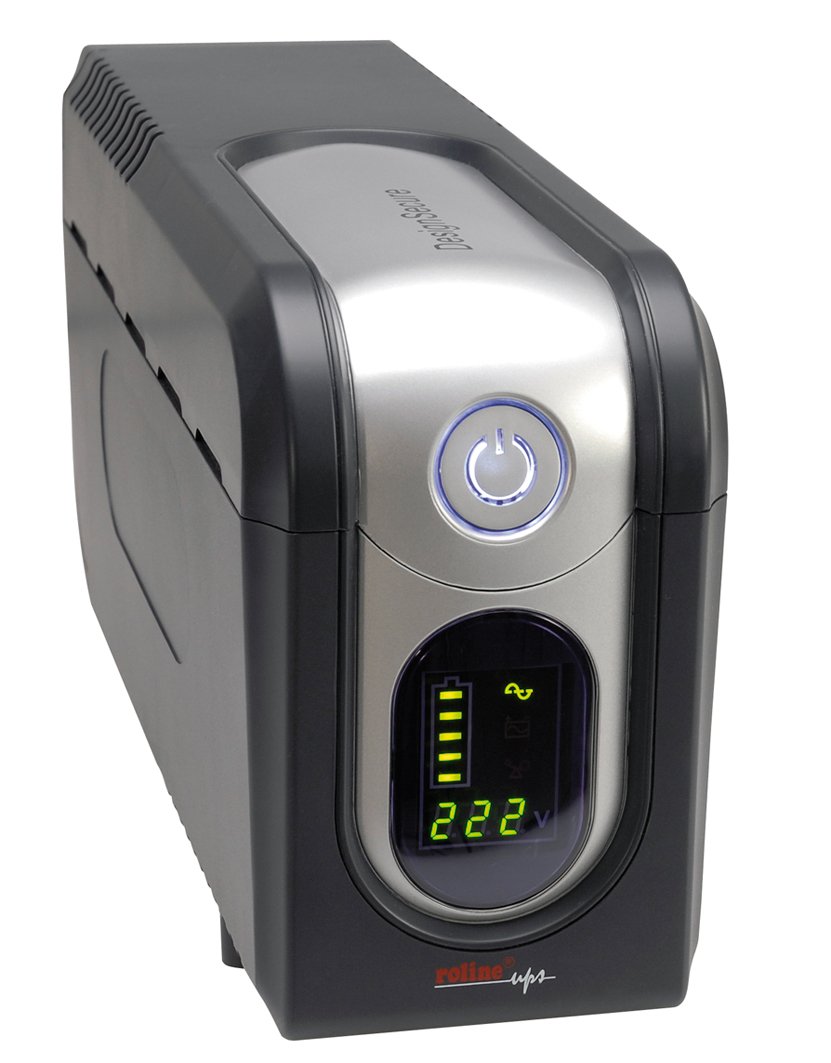
Slika 1: Prednja strana view of the Roline DesignSecure 525 UPS. This image shows the main unit, including the display panel and power outlets.
The UPS typically includes:
- Ulaz za napajanje
- Output Power Outlets (Type B - 3 pin North American)
- Control Panel / LCD Display
- USB komunikacijski port
- Telephone/Modem Protection Ports (RJ11)
4. Podešavanje
4.1. Raspakivanje
Carefully unpack the UPS and inspect it for any shipping damage. Retain the packaging for future transport or storage.
4.2. Plasman
Place the UPS on a flat, stable surface in a clean, dry, and well-ventilated area. Ensure there is adequate space around the unit for proper airflow. Avoid placing it near heat sources or in direct sunlight.
4.3. Povezivanje na napajanje
- Uverite se da je UPS isključen.
- Connect the UPS power input cable to a grounded Type B (3-pin North American) wall outlet.
- Prije prve upotrebe, ostavite UPS da se puni najmanje 8 sati kako biste osigurali optimalne performanse baterije.
4.4. Povezivanje opreme
- Connect your computer, monitor, and other critical devices to the UPS output receptacles.
- For telephone/modem line protection, connect your incoming telephone/modem line to the "IN" port on the UPS, and then connect a cable from the "OUT" port to your telephone/modem device.
- Do not connect surge strips or extension cords to the UPS output.
4.5. Instalacija softvera (opcionalno)
For advanced monitoring and management, install the provided smart monitoring software on your computer. Connect the UPS to your computer using a USB cable. Refer to the software's specific instructions for installation and configuration.
5. Uputstvo za upotrebu
5.1. Turning On the UPS
Press and hold the power button on the front panel for approximately 2-3 seconds until you hear a beep and the display illuminates. The UPS will perform a self-test and then enter online mode.
5.2. Turning Off the UPS
To turn off the UPS, press and hold the power button for approximately 2-3 seconds until you hear a beep and the display turns off. Ensure all connected devices are properly shut down before turning off the UPS.
5.3. Prikaz indikatora
The digital display provides real-time information about the UPS status, including:
- Ulazni voltage
- Output Voltage
- Nivo napunjenosti baterije
- Load Level
- Operating Mode (Online, Battery, Bypass)
- Kodovi grešaka (ako ih ima)
Refer to the software manual for detailed explanations of all display indicators and error codes.
5.4. Automatski voltage Regulacija (AVR)
The built-in AVR automatically corrects minor voltage fluctuations without switching to battery power, preserving battery life. If the input voltage goes too high or too low, the AVR will adjust it to a safe level for your connected devices.
5.5. Baterijski način rada
U slučaju napajanjatage, the UPS will automatically switch to battery power. An audible alarm will sound, and the display will indicate battery mode. The duration of battery backup depends on the load connected. The UPS will automatically shut down when the battery is depleted to prevent deep discharge.
6. Održavanje
6.1. Održavanje baterije
- To maintain optimal battery life, ensure the UPS is connected to a power source and charging when not in use.
- Izbjegavajte česta duboka pražnjenja.
- If storing the UPS for an extended period, fully charge it every three months to prevent battery degradation.
- Battery replacement should only be performed by qualified personnel.
6.2. Čišćenje
Ensure the UPS is turned off and disconnected from the power outlet before cleaning. Use a soft, dry cloth to wipe the exterior. Do not use liquid or aerosol cleaners.
6.3. Uslovi okoline
Maintain the UPS in an environment with stable temperature and humidity. Extreme conditions can shorten battery life and affect performance.
7. Otkrivanje problema
This section provides solutions to common issues you might encounter with your Roline DesignSecure 525 UPS.
| Problem | Mogući uzrok | Rješenje |
|---|---|---|
| UPS se ne uključuje. | No input power; Low battery; Power button not pressed long enough. | Check power cord connection; Allow UPS to charge for several hours; Press and hold power button for 2-3 seconds. |
| UPS beeps continuously in online mode. | Stanje preopterećenja; Unutrašnji kvar. | Reduce connected load; Disconnect non-essential devices; If problem persists, contact support. |
| Kratko vrijeme rezervnog rada baterije. | Overload; Battery nearing end of life; Battery not fully charged. | Reduce connected load; Allow UPS to charge fully; Consider battery replacement if old. |
| Connected devices not receiving power. | UPS is off; UPS is in fault mode; Output receptacles are not active. | Turn on UPS; Check display for error codes; Ensure devices are connected to battery-backed outlets. |
If the problem persists after attempting these solutions, please contact Roline customer support.
8. Specifikacije
| Feature | Detalj |
|---|---|
| Broj modela | 19401205 |
| Dimenzije proizvoda | 4.13 x 6.61 x 13.15 inča |
| Težina artikla | 12.79 funte |
| Output Voltage | 120 volti (AC) |
| Tip utikača | Tip B - 3-pinski (Sjeverna Amerika) |
| Boja | Crna / Srebrna |
| Proizvođač | ROLINE |
| Datum prve dostupnosti | 20. avgusta 2012 |
9. Garancija i podrška
9.1. Informacije o garanciji
Roline products are manufactured to high quality standards. For specific warranty terms and conditions, please refer to the warranty card included with your product or visit the official Roline webSačuvajte dokaz o kupovini za slučaj reklamacije.
9.2. Korisnička podrška
If you require technical assistance or have questions not covered in this manual, please contact Roline customer support. Contact information can typically be found on the Roline webweb-mjestu ili na ambalaži proizvoda.
Prilikom kontaktiranja podrške, pripremite broj modela (19401205) i datum kupovine.

