
1. Uvod
This manual provides detailed instructions for the setup, operation, and maintenance of your Bushnell Onix 200 Portable GPS Navigator. The Onix 200 is designed for outdoor use, offering navigation capabilities with satellite and aerial photos on a 2.7-inch sunlight-readable LCD screen. It features a rugged, waterproof design (IPX7) and 32 MB of internal memory for storing navigational data.
2. Proizvod je gotovview
2.1 Ključne karakteristike
- Navigation with satellite and aerial photos.
- Rugged rubber armor and IPX7 waterproof rating.
- Sunlight-readable 2.7-inch LCD screen.
- User Profiles for customized activity settings.
- Night-mode screen viewopcija.
- 32 MB internal memory.
- USB povezivanje.
2.2 Komponente
The Bushnell Onix 200 package typically includes:
- Bushnell Onix 200 GPS Unit
- Mount za zglob
- USB kabel (za prijenos podataka i punjenje)
- Korisnički priručnik (ovaj dokument)
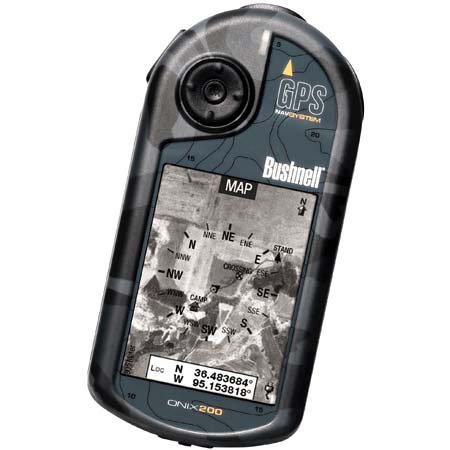
Figure 1: Bushnell Onix 200 handheld GPS unit, showing its rugged design and screen.
3. Podešavanje
3.1 Instalacija baterije
The Bushnell Onix 200 does not include batteries. It requires standard AA batteries (not included). To install:
- Pronađite poklopac odjeljka za baterije na stražnjoj strani uređaja.
- Open the cover by sliding or unlatching it according to the markings.
- Insert the required number of AA batteries, ensuring correct polarity (+/-).
- Čvrsto zatvorite poklopac odjeljka za baterije kako biste održali vodootpornost.
3.2 Početno uključivanje i osnovne postavke
- Pritisnite i držite dugme za napajanje dok se ekran ne osvijetli.
- Upon first use, the device may prompt you to set basic preferences such as language, time zone, and measurement units. Follow the on-screen instructions.
- Allow the device to acquire a GPS signal. This may take several minutes, especially during the first use or after a long period of inactivity. Ensure you are in an open area with a clear view neba.
3.3 Povezivanje sa računarom
Use the provided USB cable to connect the Onix 200 to your computer for data transfer, map updates, or firmware updates. The device is compatible with Windows operating systems.
4. Uputstvo za upotrebu
4.1 Navigation with Satellite/Aerial Photos
The Onix 200 allows you to overlay navigation information directly onto satellite or aerial photographs. This feature provides enhanced situational awareness, especially in unfamiliar terrain.
- Access the map view iz glavnog menija.
- Select the desired map type (e.g., satellite, aerial, USGS map) from the display options.
- Use the touch screen or voice controls to pan, zoom, and interact with the map.
- Your current position will be indicated on the map, along with any loaded waypoints or routes.
4.2 User Profiles
The "User Profiles" feature allows you to customize the device's settings and menu options based on your activity (e.g., hiking, fishing, hunting). This streamlines access to relevant functions.
- Idite do "Pro"files" section in the main menu.
- Odaberite postojećeg profesionalcafile ili kreirajte novu.
- Customize settings such as display preferences, data fields, and shortcut menus for that specific activity.
- Activate the desired profile before starting your activity.
4.3 Noćni način rada
For low-light conditions, activate the night-mode screen viewing option. This adjusts the display's backlight and color scheme to reduce eye strain and improve visibility in the dark.
- Access display settings from the main menu.
- Toggle the "Night Mode" option to ON.
4.4 Metode kontrole
The Onix 200 supports both touch screen and voice control for interacting with the device. Refer to the on-screen prompts and the device's internal help system for specific voice commands.
5. Održavanje
5.1 Čišćenje uređaja
- Obrišite ekran i spoljašnjost mekom krpom, damp, krpa koja ne ostavlja dlačice.
- Do not use abrasive cleaners, solvents, or aerosol sprays, as these can damage the device's finish and screen.
- Ensure all ports are dry before connecting cables.
5.2 Waterproofing Care (IPX7)
The Onix 200 is waterproof to IPX7 standards, meaning it can withstand immersion in water up to 1 meter for 30 minutes. To maintain this rating:
- Ensure the battery compartment cover and any port covers are securely closed before exposure to water.
- Ne uranjajte uređaj namjerno preko njegove nazivne dubine ili trajanja.
- If the device gets wet, dry it thoroughly before opening any compartments or connecting to power.
5.3 Skladištenje
Store the device in a cool, dry place away from direct sunlight and extreme temperatures when not in use. Remove batteries if storing for extended periods to prevent leakage.
6. Otkrivanje problema
6.1 Nema napajanja
- Check if batteries are correctly installed and fully charged.
- Zamijenite stare baterije novima.
- Provjerite da li je dugme za napajanje pritisnuto i držano dovoljno dugo.
6.2 GPS Signal Loss or Inaccuracy
- Pobrinite se da se nalazite na otvorenom prostoru sa čistim view of the sky, away from tall buildings, dense foliage, or strong electromagnetic interference.
- Allow the device more time to acquire a signal.
- Perform a soft reset (refer to the device's internal menu for this option, if available).
6.3 Ekran ne reaguje
- Provjerite da li je ekran čist i suh.
- If the touch screen is resistive, apply firm but gentle pressure.
- Ponovo pokrenite uređaj.
6.4 Device Not Connecting to Computer
- Verify the USB cable is securely connected to both the device and the computer.
- Pokušajte s drugim USB portom na svom računaru.
- Ensure necessary drivers are installed on your Windows operating system.
For further assistance, please refer to the official Bushnell support resources.
7. Specifikacije
| Feature | Specifikacija |
|---|---|
| Brand | bushnell |
| Naziv modela | Onix 200 |
| Broj modela | 36-2000 |
| Veličina ekrana | 2.7 inča |
| Rezolucija | 160 x 240 |
| Display Type | LCD |
| Tip ekrana na dodir | Resistive |
| Kapacitet memorije | 32 MB |
| Tehnologija povezivanja | USB |
| Vrsta karte | Satelit |
| Podržani sistem satelitske navigacije | GPS |
| Posebna karakteristika | Vodootporan (IPX7) |
| Kontrolni metod | Dodir, glas |
| Operativni sistem | Windows (for PC connection) |
| Dimenzije (Š x V x D) | 1.1 x 8.0 x 2.2 inča |
| Težina artikla | 15.2 unce |
| Baterije uključene | No (Requires AA) |
| UPC | 029757362001 |
8. Garancija i podrška
For detailed warranty information, product registration, and technical support, please visit the official Bushnell webstranice ili kontaktirajte njihov odjel za korisničku podršku.
Više informacija i resursa za podršku možete pronaći na Bushnell trgovina na Amazonu.