
Coby CT-P9040 SVR
Coby CT-P9040 5.8 GHz Analog Cordless Phone User Manual
Model: CT-P9040 SVR
Uvod
This manual provides comprehensive instructions for the setup, operation, and maintenance of your Coby CT-P9040 5.8 GHz Analog Cordless Phone. Please read this manual thoroughly before using your phone to ensure proper functionality and to prevent damage.
Sadržaj i komponente paketa
Prije nego što počnete, provjerite da li su sve komponente prisutne u paketu:
- Bežična slušalica
- Osnovna jedinica
- Napajanje ispravljač
- Kabl za telefonsku liniju
- Punjiva baterija
- Korisnički priručnik (ovaj dokument)
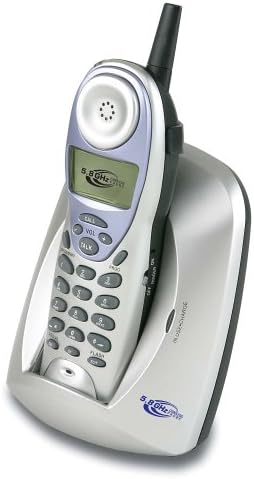
Image: The Coby CT-P9040 cordless phone, showing the handset docked in its silver base unit. The handset features a display screen, numeric keypad, and function buttons. The base unit has a charging cradle for the handset.
Vodič za postavljanje
1. Instalacija baterije
- Pronađite odeljak za baterije na poleđini slušalice.
- Otvorite poklopac odeljka za baterije.
- Connect the rechargeable battery pack connector to the jack inside the compartment.
- Place the battery pack into the compartment and close the cover securely.
2. Priključak osnovne jedinice
- Connect one end of the telephone line cord to the "LINE" jack on the back of the base unit.
- Connect the other end of the telephone line cord to a standard telephone wall jack.
- Connect the AC power adapter to the "DC IN" jack on the back of the base unit.
- Uključite AC adapter u standardnu električnu utičnicu.
3. Početno punjenje
Place the handset in the base unit's charging cradle. Ensure the "IN CHARGE" indicator light on the base unit illuminates, indicating proper charging. For optimal battery performance, charge the handset for at least 12-14 hours before initial use.
Uputstvo za upotrebu
Upućivanje poziva
- Pick up the handset from the base unit or press the TALK dugme.
- Slušajte ton biranja.
- Pozovite željeni broj telefona.
- Da biste prekinuli poziv, pritisnite TALK button again or place the handset back in the base unit.
Odgovaranje na poziv
Kada telefon zazvoni, podignite slušalicu ili pritisnite TALK dugme da odgovorite na poziv.
Funkcija ponovnog biranja
Da biste ponovo birali poslednji pozvani broj, pritisnite REDIAL dugme na slušalici.
Podešavanje jačine zvuka
Tokom poziva koristite Vol + i VOL - dugmad na slušalici za podešavanje jačine zvuka u slušalici.
Flash Funkcija
Pritisnite FLASH button to use call waiting or transfer calls if supported by your telephone service provider.
Storing Phone Numbers (Speed Dial)
Your phone can store up to 10 numbers for frequently called contacts. Refer to the detailed instructions in the full manual for programming speed dial entries.
Održavanje i njega
- Držite telefon dalje od izvora toplote, direktne sunčeve svjetlosti i vlage.
- Clean the phone's surfaces with a soft, damp tkanina. Nemojte koristiti abrazivna sredstva za čišćenje ili rastvarače.
- Provjerite jesu li kontakti za punjenje na slušalici i baznoj jedinici čisti kako biste održali pravilno punjenje.
- If the phone will not be used for an extended period, remove the battery from the handset.
Rješavanje problema
| Problem | Mogući uzrok | Rješenje |
|---|---|---|
| Nema tona za biranje | Telefonski kabel je isključen. | Provjerite je li telefonski kabel sigurno spojen i na baznu jedinicu i na zidnu utičnicu. |
| Slušalica se ne puni | Handset not properly seated in cradle or dirty charging contacts. | Reseat the handset in the base unit. Clean the charging contacts on both the handset and base unit with a dry cloth. |
| Loš kvalitet zvuka / Statički zvuk | Interference from other electronic devices or out of range. | Move the base unit away from other electronic devices (e.g., microwaves, Wi-Fi routers). Move closer to the base unit. |
| Ne mogu upućivati/primati pozive | Power adapter disconnected or battery low. | Check if the AC power adapter is securely plugged in. Ensure the handset battery is fully charged. |
Specifikacije
- Model: CT-P9040 SVR
- Učestalost: 5.8 GHz Analog
- Kanali: 40 Channel Auto Scan
- Memorija: 10-number speed dial storage
- Funkcije: Flash, Redial, Pause, Tone/Pulse Switch
- Priključak za slušalice: Built-in 2.5mm
- Montaža: Desk and Wall Mountable
- Dimenzije (D x Š x V): 5 x 8 x 4 inča
- Težina: 1.8 funte
- Boja: Srebro
- ID pozivaoca: Nije podržano
- Višelinijski rad: Jednolinijski rad
Garancija i podrška
For warranty information and technical support, please refer to the warranty card included with your product or visit the official Coby webSačuvajte račun kao dokaz o kupovini za reklamacije u slučaju reklamacije.
For further assistance, you may contact Coby customer service. Contact details are typically available on the manufacturer's websajtu ili u pakovanju proizvoda.
Ask a question about this manual
Ask about setup, troubleshooting, compatibility, parts, safety, or missing instructions. Manuals+ will review the question and use this page’s manual context to help answer it.