
Važne informacije o sigurnosti
Molimo vas da pažljivo pročitate sva uputstva prije upotrebe ovog uređaja. Sačuvajte ovaj priručnik za buduću upotrebu.
- Ne izlažite jedinicu kiši ili vlazi kako biste spriječili opasnost od požara ili strujnog udara.
- Do not block ventilation openings. Ensure proper airflow around the unit.
- Use only the power adapters supplied with the unit. Using unauthorized adapters may damage the device and void the warranty.
- Izbjegavajte postavljanje uređaja na nestabilne površine.
- Ne pokušavajte sami servisirati uređaj. Za sve servisne radove obratite se kvalifikovanom osoblju.
- Baterije odložite na odgovarajući način u skladu sa lokalnim propisima.
Sadržaj paketa
Provjerite da li su sve stavke prisutne u paketu:
- Coby TFDVD-7700 Portable DVD Player
- Punofunkcionalni daljinski upravljač
- Baterija daljinskog upravljača
- Litijum-jonska punjiva baterija
- AC strujni kabl
- 100-240V UL Adapter
- DC Car/Boat Charger
- Car/Boat AC/DC Adapter and Cassette Audio Adapter
- 2 Sets of Stereo Headphones
- Headphone Jack Splitter
- Torbica za nošenje
- Headrest Mounting Pouch
- Korisnički priručnik (ovaj dokument)
Product Overview
The Coby TFDVD-7700 is a 7-inch side-loading portable DVD player designed for entertainment on the go. It features a widescreen TFT LCD display and built-in stereo speakers.
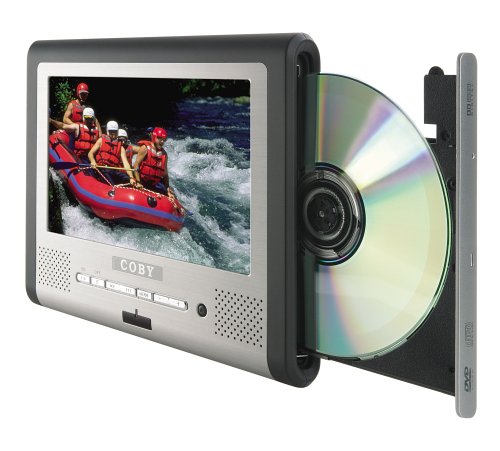
Slika 1: Coby TFDVD-7700 Portable DVD Player and its remote control. The player features a 7-inch screen, control buttons below the screen, and a side-loading DVD slot. The remote control has numerous buttons for full functionality.
Ključne karakteristike:
- 7-inch Widescreen TFT LCD Display
- Side-loading DVD Mechanism
- Multi-format Playback (DVD, MP3 CD, JPEG CD)
- Ugrađeni stereo zvučnici
- Composite Video Output for external display connection
- Punofunkcionalni daljinski upravljač
- Punjiva litijum-jonska baterija
- Picture Zoom and Parental Controls
Setup
1. Punjenje baterije
- Connect the 100-240V UL adapter to the DC IN port on the DVD player.
- Priključite adapter u standardnu zidnu utičnicu.
- Allow the unit to charge fully before first use (approximately 3-4 hours). The charging indicator light will typically change color or turn off when charging is complete.
- For in-car use, connect the DC car charger to the DC IN port and plug it into your vehicle's cigarette lighter socket.
2. Inserting the Remote Control Battery
- Otvorite odeljak za baterije na poleđini daljinskog upravljača.
- Insert the supplied battery, ensuring correct polarity (+/-).
- Čvrsto zatvorite odeljak za baterije.
3. Povezivanje s vanjskim ekranom (opcionalno)
- Locate the composite video output port on the DVD player.
- Connect a composite video cable (not always included, may need to be purchased separately) from the player's video output to the video input of your TV or monitor.
- Ensure your TV/monitor is set to the correct input source.
Uputstvo za upotrebu
1. Uključivanje / isključivanje napajanja
- To power on, slide the POWER switch to the ON position or press the POWER button on the remote.
- To power off, slide the POWER switch to the OFF position or press the POWER button on the remote.
2. Umetanje diska
- With the unit powered on, gently insert a DVD, MP3 CD, or JPEG CD into the side-loading disc slot with the label side facing up.
- Uređaj će automatski prepoznati disk i započeti reprodukciju ili prikazati meni diska.
3. Osnovne kontrole reprodukcije
Use the buttons on the unit or the remote control:
- REPRODUKCIJA/PAUZA: Pritisnite za početak ili pauziranje reprodukcije.
- STOP: Pritisnite za zaustavljanje reprodukcije.
- PRESKOČI (<< / >>): Pritisnite za prelazak na prethodno ili sljedeće poglavlje/traku.
- BRZO PREMOTAJ NAPRIJED/NAZAD: Pritisnite i držite za premotavanje unapred ili unazad.
- JAČINA (+/-): Podesite jačinu zvuka.
4. Korištenje slušalica
- Plug one or both sets of stereo headphones into the headphone jack(s).
- Use the headphone splitter to connect both sets of headphones to a single jack if needed.
- Podesite jačinu zvuka na ugodan nivo kako biste spriječili oštećenje sluha.
5. Napredne funkcije
- MENI: Access the disc's main menu.
- POSTAVITI: Access the player's system settings (e.g., language, display settings, parental controls).
- ZOOM: Enlarge a portion of the screen during video playback.
- KUT: Promijenite viewing angle on discs that support multiple angles.
- PODNASLOV: Select different subtitle tracks.
- SLOW/FAST MOTION: Control playback speed.
Održavanje
1. Čišćenje uređaja
- Obrišite vanjski dio uređaja mekom, suhom krpom.
- Za tvrdokorne tragove, dampen the cloth slightly with water, then wipe dry immediately.
- Ne koristite abrazivna sredstva za čišćenje, voskove ili rastvarače.
- To clean the screen, use a soft, lint-free cloth specifically designed for LCD screens.
2. Njega diska
- Diskove držite za rubove kako biste izbjegli otiske prstiju.
- Keep discs in their cases when not in use.
- Očistite prljave diskove mekom krpom koja ne ostavlja dlačice, brišući od centra prema van.
3. Održavanje baterije
- Recharge the battery regularly, even if the unit is not used frequently, to maintain battery life.
- Izbjegavajte ponovljeno potpuno pražnjenje baterije.
- Uređaj čuvajte na hladnom i suhom mjestu kada se ne koristi duži period.
Rješavanje problema
If you encounter issues with your Coby TFDVD-7700, refer to the following common problems and solutions:
| Problem | Mogući uzrok | Rješenje |
|---|---|---|
| Jedinica se ne uključuje. | Battery is discharged; Power adapter not connected; Power switch is OFF. | Charge the battery; Connect the power adapter; Slide the POWER switch to ON. |
| No disc detected / Disc error. | Disc is dirty or scratched; Disc inserted incorrectly; Unsupported disc format. | Clean the disc; Reinsert disc with label side up; Ensure disc is DVD, MP3 CD, or JPEG CD. |
| Nema zvuka. | Volume is too low; Headphones not connected properly; Mute function is active. | Povećajte jačinu zvuka; Ponovo priključite slušalice; Deaktivirajte zvuk bez zvuka. |
| Slika je iskrivljena ili crna. | External display connection issue; Disc problem. | Check composite video cable connection and TV input; Try a different disc. |
| Daljinski upravljač ne radi. | Battery is dead or inserted incorrectly; Obstruction between remote and player. | Replace or reinsert battery; Ensure clear line of sight to the player's IR sensor. |
Specifikacije
- Model: TFDVD-7700
- Veličina ekrana: 7 Inches (Widescreen TFT LCD)
- Podržane vrste medija: DVD, CD-R, CD-RW, SVCD, MP3 CD, JPEG CD
- Audio izlaz: Built-in Stereo Speakers, Headphone Jack
- Video izlaz: Kompozitni video
- Izvor napajanja: AC Adapter (100-240V), DC Car Charger, Rechargeable Lithium-ion Battery
- Proizvođač: Coby
Informacije o garanciji
This product is covered by a limited warranty. Please refer to the warranty card included in your original packaging for specific terms and conditions, including coverage period and service procedures. Typically, Coby products come with a 90-day warranty on parts and labor from the date of purchase.
Sačuvajte račun kao dokaz o kupovini za reklamacije u slučaju reklamacije.
Korisnička podrška
For technical assistance, troubleshooting beyond this manual, or warranty inquiries, please contact Coby customer support.
Please have your model number (TFDVD-7700) and proof of purchase ready when contacting support.
Contact information (phone number, website) would typically be provided on the manufacturer's official webweb-mjestu ili u garantnoj dokumentaciji.